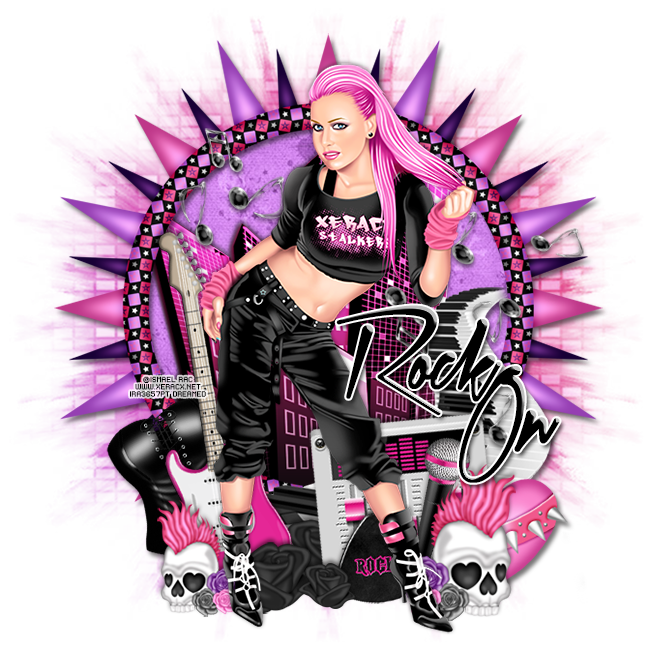
PTU tutorial using Rock Sam by Ismael Rac! Matching kit made by Wicked Princess Scraps
Spend any $$ in the store and get the awesome Rock Sam tube & matching kit for free! Just add them to your cart at checkout. GCs not accepted as payment.


**This tutorial was written by me and any resemblance is purely coincidental. It is written for those with a working knowledge of Photoshop.**
Scrap Kit
Tube
*You must obtain a license to use this tube.*
Elements
11
12
13
14
16
19
23
24
28
29
30
31
Papers
8
13
Let's start!
Open a new canvas, size 650x650.
Place 24 on the canvas. Resize and add a drop shadow.
Place paper 8 behind the frame and erase anything outside the the frame.
Place the tube in front of the frame. Resize and add a drop shadow.
Behind the frame place 16 and flip horizontally. Erase anything outside the frame.
To the left of the tube and behind her place 12. Resize and flip horizontally. Add a drop shadow.
Behind the guitar place 29. Lay it the same way as the guitar. Resize and add a drop shadow.
In front of the guitar and behind the tube's foot on the left place 23 and flip horizontally. Resize and add a drop shadow.
Behind the tube on the right place 11 and rotate to the left a little. Resize and add a drop shadow.
In front of 11 place 14. Resize and add a drop shadow.
Place 23 on the right side of the tube's foot on the right. Resize and add a drop shadow.
Behind the skull place 13 and rotate it almost upright. Resize and add a drop shadow.
Behind the skull on the right place 28. Resize and add a drop shadow.
On top of the frame on the right place 19. Erase anything that hangs out the lower left side and erase the thin end on the right side so it looks like it goes behind the frame. Add a drop shadow.
Place 30 behind the tube and resize so you have a few notes to her left. Add a drop shadow.
Take another copy of 30 and place more notes to the right of the tube over the keyboard. Resize and add a drop shadow.
Between the tube's legs and behind her place 31 by her foot on the left and in front of the guitar. Resize and add a drop shadow.
Duplicate the black rose and move to to the right of the first one and make it smaller.
Duplicate the larger rose and place it behind the guitar.
Free Snags!Place 24 on the canvas. Resize and add a drop shadow.
Place paper 8 behind the frame and erase anything outside the the frame.
Place the tube in front of the frame. Resize and add a drop shadow.
Behind the frame place 16 and flip horizontally. Erase anything outside the frame.
To the left of the tube and behind her place 12. Resize and flip horizontally. Add a drop shadow.
Behind the guitar place 29. Lay it the same way as the guitar. Resize and add a drop shadow.
In front of the guitar and behind the tube's foot on the left place 23 and flip horizontally. Resize and add a drop shadow.
Behind the tube on the right place 11 and rotate to the left a little. Resize and add a drop shadow.
In front of 11 place 14. Resize and add a drop shadow.
Place 23 on the right side of the tube's foot on the right. Resize and add a drop shadow.
Behind the skull place 13 and rotate it almost upright. Resize and add a drop shadow.
Behind the skull on the right place 28. Resize and add a drop shadow.
On top of the frame on the right place 19. Erase anything that hangs out the lower left side and erase the thin end on the right side so it looks like it goes behind the frame. Add a drop shadow.
Place 30 behind the tube and resize so you have a few notes to her left. Add a drop shadow.
Take another copy of 30 and place more notes to the right of the tube over the keyboard. Resize and add a drop shadow.
Between the tube's legs and behind her place 31 by her foot on the left and in front of the guitar. Resize and add a drop shadow.
Duplicate the black rose and move to to the right of the first one and make it smaller.
Duplicate the larger rose and place it behind the guitar.
Add your tagger mark and copyright information.
Crop off any extra canvas.
Save as a .psd & .png.

Thanks for stopping by!